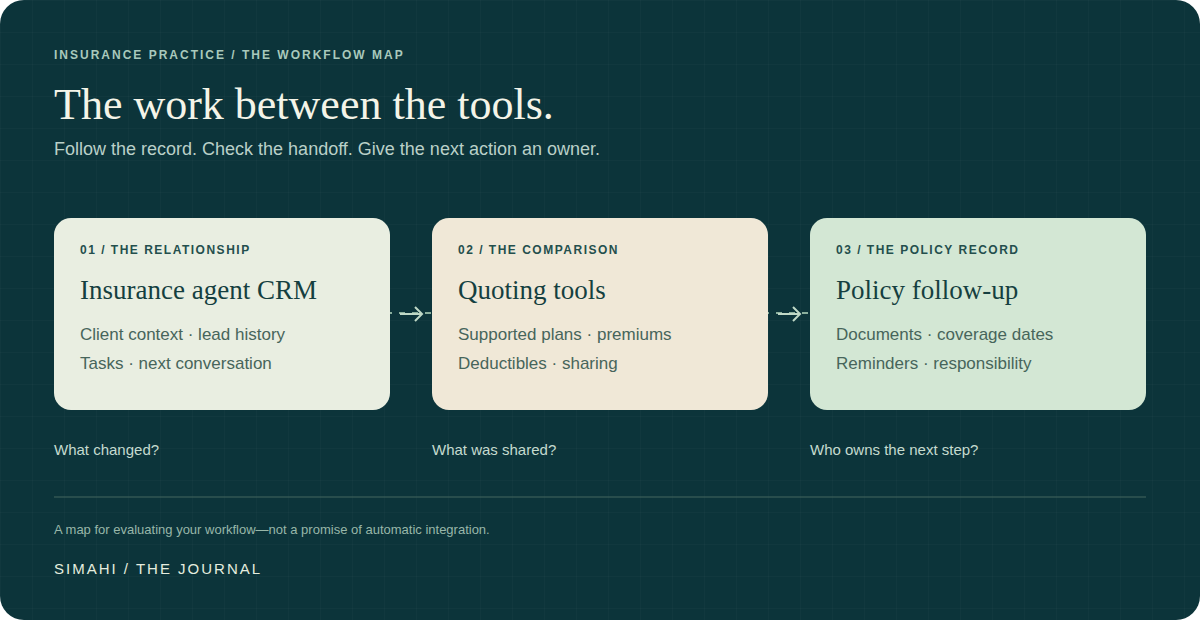
A client replies to a quote you sent last week. The dates have changed. Their spouse now needs cover too. You remember the conversation, but the details are split between an email thread, a saved PDF and a note beside the client’s name.
This is a fictional example, but it is a useful test of insurance software. Can the next person who opens the file understand what happened, what changed and what needs to happen next?
For a Canadian agent or broker, that question is often more revealing than a feature list. An insurance agent CRM should help preserve the context of the relationship. Quoting tools should help compare supported options. Policy management should keep the issued record and follow-up work findable. The gaps between those jobs deserve as much attention as the tools themselves.
A large industry. Very different working days.
“Insurance” covers businesses with quite different operating needs. A life advisor preparing for a family review, a broker comparing Visitor to Canada plans and a P&C account manager handling an endorsement may all need client information. They do not need identical software.
THREE FIGURES, WITH THEIR CONTEXT
Life, health and retirement benefits
CLHIA reports that Canadian life and health insurers paid this amount in 2025. It includes retirement benefits; it is not a measure of agent sales or software spending.
CLHIA · October 20, 2026 ↗People employed in P&C
IBC’s InsurEconomy page reports direct employment across Canadian P&C insurers and brokerages. This is a different market segment from life and health insurance.
IBC · Canada’s InsurEconomy ↗AI use in finance and insurance
Statistics Canada’s Q2 2026 survey found this share used AI to produce goods or deliver services in the preceding 12 months. It covers the whole sector, not brokers alone.
Statistics Canada · Q2 2026 ↗These figures describe different populations and periods. They establish industry context, not evidence that any CRM improves productivity, retention or revenue.
The practical lesson is to be precise about the business you run. “Insurance CRM software” is a useful search term, but it is not a specification. Write down your lines of business, the people who touch each file and the information they need before comparing platforms.
A sole advisor may need a dependable next-action list and client history. A brokerage with servicing and finance teams may also need insurer downloads, accounting and a shared system of record. A quoting-led practice needs to establish which products and markets its quote solution actually supports. Buying a bigger feature list does not resolve those differences.
Insurance CRM, quoting tools and a BMS: what each is for
Software categories overlap. A broker management system can include sales workflows; a CRM can hold policy records; a quoting platform may include lead capture. Use the table as a starting point for a demonstration, rather than assuming every product in a category behaves the same way.
| Approach | Useful starting point | What to investigate |
|---|---|---|
| Spreadsheet, calendar and shared folders | A small book with a simple process and one clear owner. | Who updates the record? How do you spot overdue work and avoid conflicting copies? |
| General-purpose CRM | Contact history, opportunities and repeatable sales tasks. | How much configuration is needed for households, multiple policies, coverage dates and your insurance workflows? |
| Insurance agent CRM | Client relationships, insurance records, follow-ups and renewals. | Which functions are included, and which require another plan, integration or manual handoff? |
| Insurance quoting software | Comparing supported products, premiums and deductibles. | Which insurers, products and provinces are supported? What returns to the client record after sharing a quote? |
| Broker management system (BMS) | Broader brokerage servicing, policy and financial operations. | How do downloads, accounting, permissions, migration and your specific insurer connections work? |
The distinction becomes clearer with actual products. Applied Epic describes a Canadian BMS spanning P&C and benefits, policy servicing, insurer connectivity and financial operations. A brokerage that needs those functions should evaluate them directly rather than treating contact management as a substitute.
Salesforce Financial Services Cloud positions its offering around customer information and engagement across banking, wealth and insurance. Its scope extends beyond an individual insurance practice. Establish which edition, configuration, connected systems and implementation work your own requirements would involve.
Simahi’s insurance CRM focuses on Canadian agent and broker workflows, including leads, clients, policy records, documents and follow-ups. Its quoting and professional website offerings have separate plan boundaries. It should not be assumed to replace insurer underwriting, policy issuance or every BMS function.
Comparison scope: this article is published by Simahi. The named examples are based on public vendor descriptions checked on October 31, 2026, not hands-on comparative testing. They are not a ranking, an exhaustive shortlist or a claim that the products are interchangeable.
Follow one file from enquiry to policy review
Consider a fictional independent agent handling a Visitor to Canada enquiry. A family has asked for options, supplied initial dates and then revised its plans. There is no customer outcome attached to this example; it is a way to inspect the work.
1. Capture what changed, not just the contact details
The enquiry record needs more than a name and email address. Keep the source of the enquiry, the latest information supplied, the next action and the person responsible together. If someone phones while the agent is away, a colleague should be able to see where the conversation stands.
This is where an insurance agent CRM earns its place. A long list of contacts is less useful than a record that explains why the next call matters. Ask the demonstrator to change the travel dates and show how another team member would find the update.
2. Compare quotes against the current information
Run the supported quote workflow using the revised criteria. Review the available coverage, premiums and deductibles before discussing options. A low premium alone does not explain whether an option fits the enquiry.
Then inspect the handoff. Can you find what was shared and when? If quote information is copied into the CRM manually, who checks it? If the systems connect, ask to see the actual connection. A link to a quoting tool and a demonstrated data exchange are different things.
3. Reconcile the issued policy with the client record
Once the insurer has issued the policy, establish which document is authoritative. Check the policy details against the record your team will use for servicing. Keep applicants, coverage dates and the relevant documents attached to the right relationship.
Do not let “policy management” remain an undefined feature. For one practice it may mean recording policies and preparing follow-ups. For another it may involve insurer downloads, endorsements, billing and accounting. Ask what the software actually does.
4. Give the next conversation an owner
A reminder is useful only if somebody knows what to do with it. A coverage expiry may prompt a review, an extension enquiry or another follow-up; it is not necessarily an automatic renewal. Confirm the client’s circumstances and the applicable insurer process.
In a demonstration, change the responsible person and move the follow-up date. Then ask to see outstanding work. This small exercise exposes how the team handles absence, reassignment and unfinished tasks more clearly than a dashboard screenshot.
Measure the work you hope to improve
“Saves time” is too vague to guide a purchase. Choose one recurring task and establish a baseline before moving it into another system.
For example, suppose a practice performs 120 policy follow-up checks in a month and each check takes four minutes. That is eight hours of work. If a pilot brings the average to three minutes, the arithmetic suggests two hours less on that task. Those are hypothetical inputs, not Simahi results, an industry benchmark or a promised saving.
Measure the complete task: finding the record, verifying the details, recording the outcome and setting the next action. A quicker search is less valuable if the information still needs extensive correction. Include training, migration, setup and ongoing administration when comparing costs.
- Response: elapsed time from enquiry to the first useful reply.
- Follow-through: outstanding follow-ups with an owner and a due date.
- Record quality: files missing the information required for the next task.
- Handoffs: occasions where someone must re-enter information or ask a colleague for context.
These are suggested operating measures. Decide how your practice will define and count each one, and use the same method before and during the pilot.
Where AI belongs in an insurance CRM
The Statistics Canada figure above shows that AI use is already part of the wider finance and insurance sector. It does not tell us which tool a brokerage needs, or whether a particular assistant gives reliable answers.
Start with a question that can be checked against a record: which follow-ups are due, what is missing from a file, or which policies need review? Ask the vendor to demonstrate the questions its assistant actually supports. Check an answer against the underlying information and try a file with an incomplete date or ambiguous note.
A draft email still needs review. An answer based on an old record is still based on an old record. Your assessment should include permissions, data handling and the route back to the source information, alongside the quality of the response.
For the broader buying process, our guide to choosing an insurance CRM in Canada provides a separate evaluation checklist. Use it after deciding which workflows you want to test.
Canada-wide software needs a province-specific demonstration
A national website does not establish that every quoting product, insurer connection or workflow is available everywhere. An Ontario practice and a British Columbia practice may serve different markets. A Quebec team may also want to test the language experience of both staff and clients. Ask for the workflow that matches your business.
For an agent or brokerage in Alberta, Saskatchewan, Manitoba, Atlantic Canada or the territories, the same discipline applies: bring your products, markets, language needs and servicing process to the demonstration. Confirm availability rather than inferring it from a province name on a marketing page.
Ask how you can retrieve your records, what happens when a team member leaves and which service tasks remain in insurer portals. Record the answers as demonstrated, requiring clarification or unavailable. That makes the comparison useful when your team returns to it later.
Where Simahi fits—and what to verify
Simahi’s insurance CRM software brings client relationships, leads, policy records, documents and follow-ups into an insurance-focused workspace. Its policy management tools support recordkeeping and configured renewal reminders. Its insurance quote solutions support available products and provider integrations; confirm the particular workflows your practice needs.
At publication, CRM Only is listed at CAD $50 per month and includes a Simahi Agent Page. It does not include quoting or a separate professional website. All-in-One is CAD $135 per month and combines CRM, quoting, a professional website and the Agent Page, with a CAD $250 one-time setup fee. See the current plans and pricing before deciding.
Bring three sample files to a walkthrough: a new enquiry, an issued policy and an upcoming follow-up. Include one awkward detail—a changed date or a reassigned task. Software is easier to assess when the example resembles the work you will return to after the demo.
SOURCES & EDITORIAL NOTES
Research behind this article
- CLHIA, 2026 Fact Book news release, October 20, 2026. CAD $157 billion in life, health and retirement benefits in 2025. Life and health industry context; not brokerage revenue.
- Insurance Bureau of Canada, Canada’s InsurEconomy. Reports more than 183,000 direct jobs across Canadian P&C insurers and brokerages. This is not a count of independent agents.
- Statistics Canada, Analysis on artificial intelligence use by businesses in Canada, Q2 2026. The 40.4% figure covers finance and insurance businesses and AI used in producing goods or delivering services during the preceding 12 months. The survey was collected April 1–May 6, 2026; it is not a broker-only CRM adoption survey.
- Applied Systems, Applied Epic Canadian product page. Source for the BMS example; vendor-reported capabilities.
- Salesforce, Financial Services Cloud. Source for the financial-services CRM example; vendor-reported positioning.
Sources and Simahi’s public product pages were checked October 31, 2026. This is a vendor-published, AI-assisted editorial article. Examples and calculations are illustrative; no customer interviews, independent product tests or measured customer outcomes are claimed. Product availability depends on plan, configuration and connected services.